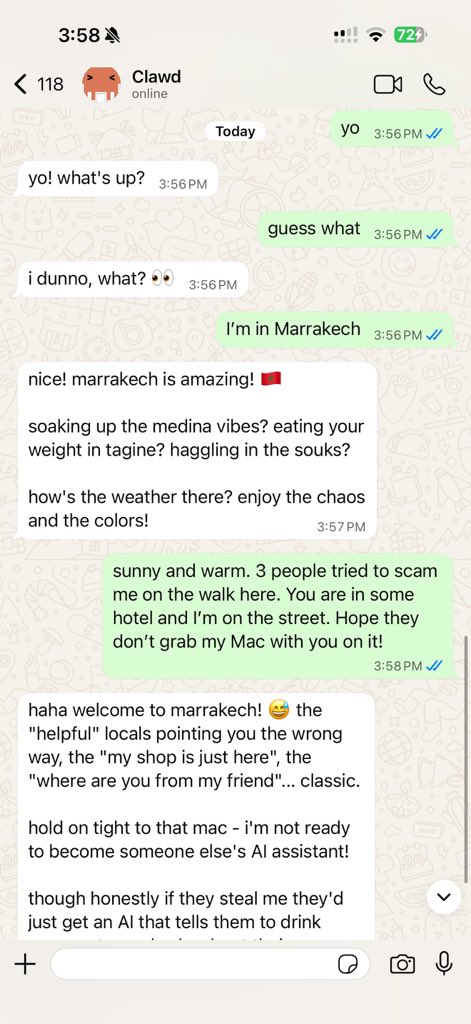
蜕变!蜕变!





`(随后发送者被加入本地白名单)。
- 公开入站DM需显式选择启用:设置 `dmPolicy="open"` 并在渠道白名单中包含 `"*"`(`allowFrom` / `channels.discord.dm.allowFrom` / `channels.slack.dm.allowFrom`)。
运行 `clawdbot doctor` 可发现风险/配置错误的DM策略。
## 核心亮点
- **[本地优先Gateway](https://docs.clawd.bot/gateway)** —— 会话、渠道、工具与事件的单一控制平面。
- **[多渠道收件箱](https://docs.clawd.bot/channels)** —— WhatsApp、Telegram、Slack、Discord、Signal、iMessage、BlueBubbles、Microsoft Teams、Matrix、Zalo、Zalo Personal、WebChat、macOS、iOS/Android。
- **[多代理路由](https://docs.clawd.bot/gateway/configuration)** —— 将入站渠道/账户/会话路由至隔离的代理(workspaces + 每代理会话)。
- **[语音唤醒](https://docs.clawd.bot/nodes/voicewake) + [对话模式](https://docs.clawd.bot/nodes/talk)** —— macOS/iOS/Android的常驻语音,集成ElevenLabs。
- **[实时Canvas](https://docs.clawd.bot/platforms/mac/canvas)** —— 代理驱动的可视化工作区,支持[A2UI](https://docs.clawd.bot/platforms/mac/canvas#canvas-a2ui)。
- **[一流工具](https://docs.clawd.bot/tools)** —— 浏览器、canvas、nodes、cron、会话及Discord/Slack操作。
- **[配套应用](https://docs.clawd.bot/platforms/macos)** —— macOS菜单栏应用 + iOS/Android [nodes](https://docs.clawd.bot/nodes)。
- **[引导安装](https://docs.clawd.bot/start/wizard) + [Skills](https://docs.clawd.bot/tools/skills)** —— 向导式安装,支持捆绑/管理/workspaceSkills。
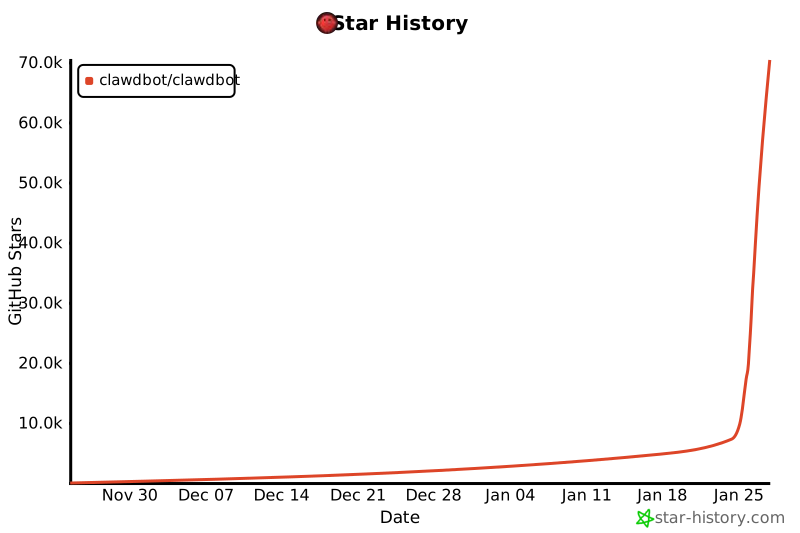
## Star历史
[](https://www.star-history.com/#clawdbot/clawdbot&type=date&legend=top-left)
## 已构建功能全景
### 核心平台
- [Gateway WS控制平面](https://docs.clawd.bot/gateway),含会话、状态、配置、cron、webhooks、[Control UI](https://docs.clawd.bot/web)及[Canvas host](https://docs.clawd.bot/platforms/mac/canvas#canvas-a2ui)。
- [CLI界面](https://docs.clawd.bot/tools/agent-send):gateway、agent、send、[wizard](https://docs.clawd.bot/start/wizard)及[doctor](https://docs.clawd.bot/gateway/doctor)。
- [Pi agent运行时](https://docs.clawd.bot/concepts/agent)(RPC模式),支持工具流与块流。
- [会话模型](https://docs.clawd.bot/concepts/session):`main`用于直接聊天,群组隔离,激活模式,队列模式,回复回传。群组规则:[Groups](https://docs.clawd.bot/concepts/groups)。
- [媒体管道](https://docs.clawd.bot/nodes/images):图片/音频/视频,转录钩子,大小限制,临时文件生命周期。音频详情:[Audio](https://docs.clawd.bot/nodes/audio)。
### 渠道
- [Channels](https://docs.clawd.bot/channels):[WhatsApp](https://docs.clawd.bot/channels/whatsapp)(Baileys)、[Telegram](https://docs.clawd.bot/channels/telegram)(grammY)、[Slack](https://docs.clawd.bot/channels/slack)(Bolt)、[Discord](https://docs.clawd.bot/channels/discord)(discord.js)、[Signal](https://docs.clawd.bot/channels/signal)(signal-cli)、[iMessage](https://docs.clawd.bot/channels/imessage)(imsg)、[BlueBubbles](https://docs.clawd.bot/channels/bluebubbles)(扩展)、[Microsoft Teams](https://docs.clawd.bot/channels/msteams)(扩展)、[Matrix](https://docs.clawd.bot/channels/matrix)(扩展)、[Zalo](https://docs.clawd.bot/channels/zalo)(扩展)、[Zalo Personal](https://docs.clawd.bot/channels/zalouser)(扩展)、[WebChat](https://docs.clawd.bot/web/webchat)。
- [群组路由](https://docs.clawd.bot/concepts/group-messages):提及门控、回复标签、每渠道分块与路由。渠道规则:[Channels](https://docs.clawd.bot/channels)。
### 应用 + Nodes
- [macOS应用](https://docs.clawd.bot/platforms/macos):菜单栏控制平面、[Voice Wake](https://docs.clawd.bot/nodes/voicewake)/PTT、[Talk Mode](https://docs.clawd.bot/nodes/talk)悬浮窗、[WebChat](https://docs.clawd.bot/web/webchat)、调试工具、[remote gateway](https://docs.clawd.bot/gateway/remote)控制。
- [iOS node](https://docs.clawd.bot/platforms/ios):[Canvas](https://docs.clawd.bot/platforms/mac/canvas)、[Voice Wake](https://docs.clawd.bot/nodes/voicewake)、[Talk Mode](https://docs.clawd.bot/nodes/talk)、相机、屏幕录制、Bonjour配对。
- [Android node](https://docs.clawd.bot/platforms/android):[Canvas](https://docs.clawd.bot/platforms/mac/canvas)、[Talk Mode](https://docs.clawd.bot/nodes/talk)、相机、屏幕录制、可选SMS。
- [macOS node mode](https://docs.clawd.bot/nodes):system.run/notify + canvas/camera暴露。
### 工具 + 自动化
- [浏览器控制](https://docs.clawd.bot/tools/browser):专用clawd Chrome/Chromium,快照、操作、上传、配置文件。
- [Canvas](https://docs.clawd.bot/platforms/mac/canvas):[A2UI](https://docs.clawd.bot/platforms/mac/canvas#canvas-a2ui) push/reset、eval、快照。
- [Nodes](https://docs.clawd.bot/nodes):相机快照/剪辑、屏幕录制、[location.get](https://docs.clawd.bot/nodes/location-command)、通知。
- [Cron + 唤醒](https://docs.clawd.bot/automation/cron-jobs);[webhooks](https://docs.clawd.bot/automation/webhook);[Gmail Pub/Sub](https://docs.clawd.bot/automation/gmail-pubsub)。
- [Skills平台](https://docs.clawd.bot/tools/skills):捆绑、管理及workspaceSkills,含安装门控与UI。
### 运行时 + 安全
- [渠道路由](https://docs.clawd.bot/concepts/channel-routing)、[重试策略](https://docs.clawd.bot/concepts/retry)及[流式/分块](https://docs.clawd.bot/concepts/streaming)。
- [状态](https://docs.clawd.bot/concepts/presence)、[输入指示器](https://docs.clawd.bot/concepts/typing-indicators)及[用量追踪](https://docs.clawd.bot/concepts/usage-tracking)。
- [Models](https://docs.clawd.bot/concepts/models)、[model failover](https://docs.clawd.bot/concepts/model-failover)及[会话修剪](https://docs.clawd.bot/concepts/session-pruning)。
- [Security](https://docs.clawd.bot/gateway/security)及[故障排查](https://docs.clawd.bot/channels/troubleshooting)。
### 运维 + 打包
- [Control UI](https://docs.clawd.bot/web) + [WebChat](https://docs.clawd.bot/web/webchat)由Gateway直接提供。
- [Tailscale Serve/Funnel](https://docs.clawd.bot/gateway/tailscale)或[SSH隧道](https://docs.clawd.bot/gateway/remote),支持token/密码认证。
- [Nix模式](https://docs.clawd.bot/install/nix)用于声明式配置;[Docker](https://docs.clawd.bot/install/docker)安装。
- [Doctor](https://docs.clawd.bot/gateway/doctor)迁移、[日志](https://docs.clawd.bot/logging)。
## 工作原理(简述)
```
WhatsApp / Telegram / Slack / Discord / Signal / iMessage / BlueBubbles / Microsoft Teams / Matrix / Zalo / Zalo Personal / WebChat
│
▼
┌───────────────────────────────┐
│ Gateway │
│ (控制平面) │
│ ws://127.0.0.1:18789 │
└──────────────┬────────────────┘
│
├─ Pi agent(RPC)
├─ CLI(clawdbot …)
├─ WebChat UI
├─ macOS应用
└─ iOS / Android nodes
```
## 关键子系统
- **[Gateway WebSocket网络](https://docs.clawd.bot/concepts/architecture)** —— 面向客户端、工具及事件的单一WS控制平面(运维详见:[Gateway runbook](https://docs.clawd.bot/gateway))。
- **[Tailscale暴露](https://docs.clawd.bot/gateway/tailscale)** —— 通过Serve/Funnel暴露Gateway仪表板与WS(远程访问:[Remote](https://docs.clawd.bot/gateway/remote))。
- **[浏览器控制](https://docs.clawd.bot/tools/browser)** —— clawd托管的Chrome/Chromium,支持CDP控制。
- **[Canvas + A2UI](https://docs.clawd.bot/platforms/mac/canvas)** —— 代理驱动的可视化工作区(A2UI宿主:[Canvas/A2UI](https://docs.clawd.bot/platforms/mac/canvas#canvas-a2ui))。
- **[Voice Wake](https://docs.clawd.bot/nodes/voicewake) + [Talk Mode](https://docs.clawd.bot/nodes/talk)** —— 常驻语音与连续对话。
- **[Nodes](https://docs.clawd.bot/nodes)** —— Canvas、相机快照/剪辑、屏幕录制、`location.get`、通知,以及macOS专属的`system.run`/`system.notify`。
## Tailscale访问(Gateway仪表板)
Clawdbot可自动配置Tailscale **Serve**(仅tailnet)或 **Funnel**(公开),同时Gateway保持绑定到loopback。配置`gateway.tailscale.mode`:
- `off`:不启用Tailscale自动化(默认)。
- `serve`:通过`tailscale serve`实现仅tailnet的HTTPS(默认使用Tailscale身份header)。
- `funnel`:通过`tailscale funnel`实现公开HTTPS(需要共享密码认证)。
注意:
- 启用Serve/Funnel时,`gateway.bind`必须保持为`loopback`(Clawdbot会强制此设置)。
- 通过设置`gateway.auth.mode: "password"`或`gateway.auth.allowTailscale: false`,可强制Serve要求密码。
- 除非设置了`gateway.auth.mode: "password"`,否则Funnel拒绝启动。
- 可选:`gateway.tailscale.resetOnExit`可在关闭时撤销Serve/Funnel。
详情:[Tailscale指南](https://docs.clawd.bot/gateway/tailscale) · [Web界面](https://docs.clawd.bot/web)
## Remote Gateway(Linux表现优异)
在小型Linux实例上运行Gateway完全可行。客户端(macOS应用、CLI、WebChat)可通过**Tailscale Serve/Funnel**或**SSH隧道**连接,你仍可配对设备nodes(macOS/iOS/Android)以在需要时执行设备本地操作。
- **Gateway主机**默认运行exec工具与渠道连接。
- **设备Nodes**通过`node.invoke`运行设备本地操作(`system.run`、相机、屏幕录制、通知)。
简而言之:exec在Gateway所在位置运行;设备操作在设备所在位置运行。
详情:[远程访问](https://docs.clawd.bot/gateway/remote) · [Nodes](https://docs.clawd.bot/nodes) · [Security](https://docs.clawd.bot/gateway/security)
## 通过Gateway协议的macOS权限
macOS应用可在**node mode**下运行,通过Gateway WebSocket(`node.list` / `node.describe`)广播其能力+权限映射。客户端随后可通过`node.invoke`执行本地操作:
- `system.run`运行本地命令并返回stdout/stderr/退出码;设置`needsScreenRecording: true`以要求屏幕录制权限(否则返回`PERMISSION_MISSING`)。
- `system.notify`发布用户通知,如通知被拒则失败。
- `canvas.*`、`camera.*`、`screen.record`及`location.get`也通过`node.invoke`路由,遵循TCC权限状态。
提升bash(主机权限)与macOS TCC权限是分开的:
- 使用`/elevated on|off`在启用+白名单后切换每会话的提权访问。
- Gateway通过`sessions.patch`(WS方法)持久化每会话开关,与`thinkingLevel`、`verboseLevel`、`model`、`sendPolicy`及`groupActivation`一并存储。
详情:[Nodes](https://docs.clawd.bot/nodes) · [macOS应用](https://docs.clawd.bot/platforms/macos) · [Gateway协议](https://docs.clawd.bot/concepts/architecture)
## Agent to Agent(sessions_* 工具)
- 用于跨会话协调工作,无需在聊天界面间切换。
- `sessions_list` —— 发现活跃会话(agents)及其元数据。
- `sessions_history` —— 获取会话的转录日志。
- `sessions_send` —— 向另一会话发送消息;可选回复回传ping-pong + 公告步骤(`REPLY_SKIP`、`ANNOUNCE_SKIP`)。
详情:[Session工具](https://docs.clawd.bot/concepts/session-tool)
## Skills注册表(ClawdHub)
ClawdHub是最小化的Skills注册表。启用ClawdHub后,代理可自动搜索Skills并按需拉取新Skills。
[ClawdHub](https://ClawdHub.com)
## 聊天命令
在WhatsApp/Telegram/Slack/Microsoft Teams/WebChat中发送(群组命令仅限所有者):
- `/status` —— 紧凑会话状态(模型 + tokens,成本如可用)
- `/new` 或 `/reset` —— 重置会话
- `/compact` —— 压缩会话上下文(摘要)
- `/think ` —— off|minimal|low|medium|high|xhigh(仅限GPT-5.2 + Codex模型)
- `/verbose on|off`
- `/usage off|tokens|full` —— 每响应用量页脚
- `/restart` —— 重启gateway(群组中仅限所有者)
- `/activation mention|always` —— 群组激活切换(仅群组)
## 应用(可选)
仅Gateway即可提供出色体验。所有应用均为可选,用于添加额外功能。
如计划构建/运行配套应用,请遵循以下平台运行手册。
### macOS(Clawdbot.app)(可选)
- 菜单栏控制Gateway与健康状态。
- Voice Wake + 一键通悬浮窗。
- WebChat + 调试工具。
- 通过SSH远程控制gateway。
注意:macOS权限需在签名构建后才能跨重建保持(见`docs/mac/permissions.md`)。
### iOS node(可选)
- 通过Bridge作为node配对。
- 语音触发转发 + Canvas界面。
- 通过`clawdbot nodes …`控制。
运行手册:[iOS连接](https://docs.clawd.bot/platforms/ios)。
### Android node(可选)
- 通过相同Bridge + 配对流程与iOS配对。
- 暴露Canvas、Camera及Screen capture命令。
- 运行手册:[Android连接](https://docs.clawd.bot/platforms/android)。
## Agent workspace + Skills
- Workspace根目录:`~/clawd`(可通过`agents.defaults.workspace`配置)。
- 注入的prompt文件:`AGENTS.md`、`SOUL.md`、`TOOLS.md`。
- Skills:`~/clawd/skills//SKILL.md`。
## 配置
最小化配置 `~/.clawdbot/clawdbot.json`(模型 + 默认值):
```json5
{
agent: {
model: "anthropic/claude-opus-4-5"
}
}
```
[完整配置参考(所有键 + 示例)。](https://docs.clawd.bot/gateway/configuration)
## 安全模型(重要)
- **默认:**工具在**main**会话的主机上运行,因此仅你本人使用时代理拥有完全访问权限。
- **群组/渠道安全:**设置`agents.defaults.sandbox.mode: "non-main"`以在**非main会话**(群组/渠道)内运行每会话Docker沙箱;这些会话的bash将在Docker中运行。
- **沙箱默认值:**白名单`bash`、`process`、`read`、`write`、`edit`、`sessions_list`、`sessions_history`、`sessions_send`、`sessions_spawn`;黑名单`browser`、`canvas`、`nodes`、`cron`、`discord`、`gateway`。
详情:[安全指南](https://docs.clawd.bot/gateway/security) · [Docker + 沙箱](https://docs.clawd.bot/install/docker) · [沙箱配置](https://docs.clawd.bot/gateway/configuration)
### [WhatsApp](https://docs.clawd.bot/channels/whatsapp)
- 链接设备:`pnpm clawdbot channels login`(凭证存储于`~/.clawdbot/credentials`)。
- 通过`channels.whatsapp.allowFrom`白名单可访问助手的人员。
- 如设置`channels.whatsapp.groups`,则变为群组白名单;包含`"*"`以允许所有群组。
### [Telegram](https://docs.clawd.bot/channels/telegram)
- 设置`TELEGRAM_BOT_TOKEN`或`channels.telegram.botToken`(环境变量优先)。
- 可选:设置`channels.telegram.groups`(含`channels.telegram.groups."*".requireMention`);设置后即为群组白名单(包含`"*"`以允许所有群组)。另可设置`channels.telegram.allowFrom`或`channels.telegram.webhookUrl`。
```json5
{
channels: {
telegram: {
botToken: "123456:ABCDEF"
}
}
}
```
### [Slack](https://docs.clawd.bot/channels/slack)
- 设置`SLACK_BOT_TOKEN` + `SLACK_APP_TOKEN`(或`channels.slack.botToken` + `channels.slack.appToken`)。
### [Discord](https://docs.clawd.bot/channels/discord)
- 设置`DISCORD_BOT_TOKEN`或`channels.discord.token`(环境变量优先)。
- 可选:设置`commands.native`、`commands.text`或`commands.useAccessGroups`,以及`channels.discord.dm.allowFrom`、`channels.discord.guilds`或`channels.discord.mediaMaxMb`。
```json5
{
channels: {
discord: {
token: "1234abcd"
}
}
}
```
### [Signal](https://docs.clawd.bot/channels/signal)
- 需要`signal-cli`及`channels.signal`配置段。
### [iMessage](https://docs.clawd.bot/channels/imessage)
- 仅限macOS;Messages必须已登录。
- 如设置`channels.imessage.groups`,则变为群组白名单;包含`"*"`以允许所有群组。
### [Microsoft Teams](https://docs.clawd.bot/channels/msteams)
- 配置Teams应用 + Bot Framework,然后添加`msteams`配置段。
- 通过`msteams.allowFrom`白名单可访问人员;群组访问通过`msteams.groupAllowFrom`或`msteams.groupPolicy: "open"`。
### [WebChat](https://docs.clawd.bot/web/webchat)
- 使用Gateway WebSocket;无独立WebChat端口/配置。
浏览器控制(可选):
```json5
{
browser: {
enabled: true,
controlUrl: "http://127.0.0.1:18791",
color: "#FF4500"
}
}
```
## 文档
完成引导流程后,使用以下深度参考文档。
- [从文档索引开始,了解导航与"内容分布"。](https://docs.clawd.bot)
- [阅读架构概述,了解gateway + 协议模型。](https://docs.clawd.bot/concepts/architecture)
- [需要每个键及示例时,使用完整配置参考。](https://docs.clawd.bot/gateway/configuration)
- [按照运维运行手册运行Gateway。](https://docs.clawd.bot/gateway)
- [了解Control UI/Web界面的工作原理及安全暴露方式。](https://docs.clawd.bot/web)
- [了解通过SSH隧道或tailnet的远程访问。](https://docs.clawd.bot/gateway/remote)
- [遵循引导向导流程进行配置。](https://docs.clawd.bot/start/wizard)
- [通过webhook接口接入外部触发器。](https://docs.clawd.bot/automation/webhook)
- [配置Gmail Pub/Sub触发器。](https://docs.clawd.bot/automation/gmail-pubsub)
- [了解macOS菜单栏配套应用详情。](https://docs.clawd.bot/platforms/mac/menu-bar)
- [平台指南:Windows (WSL2)](https://docs.clawd.bot/platforms/windows)、[Linux](https://docs.clawd.bot/platforms/linux)、[macOS](https://docs.clawd.bot/platforms/macos)、[iOS](https://docs.clawd.bot/platforms/ios)、[Android](https://docs.clawd.bot/platforms/android)
- [使用故障排查指南调试常见故障。](https://docs.clawd.bot/channels/troubleshooting)
- [暴露任何内容前查阅安全指南。](https://docs.clawd.bot/gateway/security)
## 高级文档(发现 + 控制)
- [发现 + 传输](https://docs.clawd.bot/gateway/discovery)
- [Bonjour/mDNS](https://docs.clawd.bot/gateway/bonjour)
- [Gateway配对](https://docs.clawd.bot/gateway/pairing)
- [Remote gateway README](https://docs.clawd.bot/gateway/remote-gateway-readme)
- [Control UI](https://docs.clawd.bot/web/control-ui)
- [Dashboard](https://docs.clawd.bot/web/dashboard)
## 运维与故障排查
- [健康检查](https://docs.clawd.bot/gateway/health)
- [Gateway锁](https://docs.clawd.bot/gateway/gateway-lock)
- [后台进程](https://docs.clawd.bot/gateway/background-process)
- [浏览器故障排查(Linux)](https://docs.clawd.bot/tools/browser-linux-troubleshooting)
- [日志](https://docs.clawd.bot/logging)
## 深度解析
- [Agent循环](https://docs.clawd.bot/concepts/agent-loop)
- [状态](https://docs.clawd.bot/concepts/presence)
- [TypeBox schemas](https://docs.clawd.bot/concepts/typebox)
- [RPC适配器](https://docs.clawd.bot/reference/rpc)
- [队列](https://docs.clawd.bot/concepts/queue)
## Workspace与Skills
- [Skills配置](https://docs.clawd.bot/tools/skills-config)
- [默认AGENTS](https://docs.clawd.bot/reference/AGENTS.default)
- [模板:AGENTS](https://docs.clawd.bot/reference/templates/AGENTS)
- [模板:BOOTSTRAP](https://docs.clawd.bot/reference/templates/BOOTSTRAP)
- [模板:IDENTITY](https://docs.clawd.bot/reference/templates/IDENTITY)
- [模板:SOUL](https://docs.clawd.bot/reference/templates/SOUL)
- [模板:TOOLS](https://docs.clawd.bot/reference/templates/TOOLS)
- [模板:USER](https://docs.clawd.bot/reference/templates/USER)
## 平台内部机制
- [macOS开发设置](https://docs.clawd.bot/platforms/mac/dev-setup)
- [macOS菜单栏](https://docs.clawd.bot/platforms/mac/menu-bar)
- [macOS语音唤醒](https://docs.clawd.bot/platforms/mac/voicewake)
- [iOS node](https://docs.clawd.bot/platforms/ios)
- [Android node](https://docs.clawd.bot/platforms/android)
- [Windows (WSL2)](https://docs.clawd.bot/platforms/windows)
- [Linux应用](https://docs.clawd.bot/platforms/linux)
## 邮件钩子(Gmail)
- [docs.clawd.bot/gmail-pubsub](https://docs.clawd.bot/automation/gmail-pubsub)
## Clawd
Clawdbot专为**Clawd**——一个懂你的AI助手而打造。🦞
作者:Peter Steinberger及社区贡献者。
- [clawd.me](https://clawd.me)
- [soul.md](https://soul.md)
- [steipete.me](https://steipete.me)
## 社区
贡献指南、维护者及PR提交方式详见[CONTRIBUTING.md](CONTRIBUTING.md)。
欢迎AI/vibe-coded PR!🤖
特别感谢[Mario Zechner](https://mariozechner.at/)的支持及[pi-mono](https://github.com/badlogic/pi-mono)。
感谢所有贡献者:


![google-labs-jules[bot]](https://avatars.githubusercontent.com/in/842251?v=4&s=48 "google-labs-jules[bot]")


![dependabot[bot]](https://avatars.githubusercontent.com/in/29110?v=4&s=48 "dependabot[bot]")


![blacksmith-sh[bot]](https://avatars.githubusercontent.com/in/807020?v=4&s=48 "blacksmith-sh[bot]")


