# 🦞 Clawdbot + Mobile GitHub App
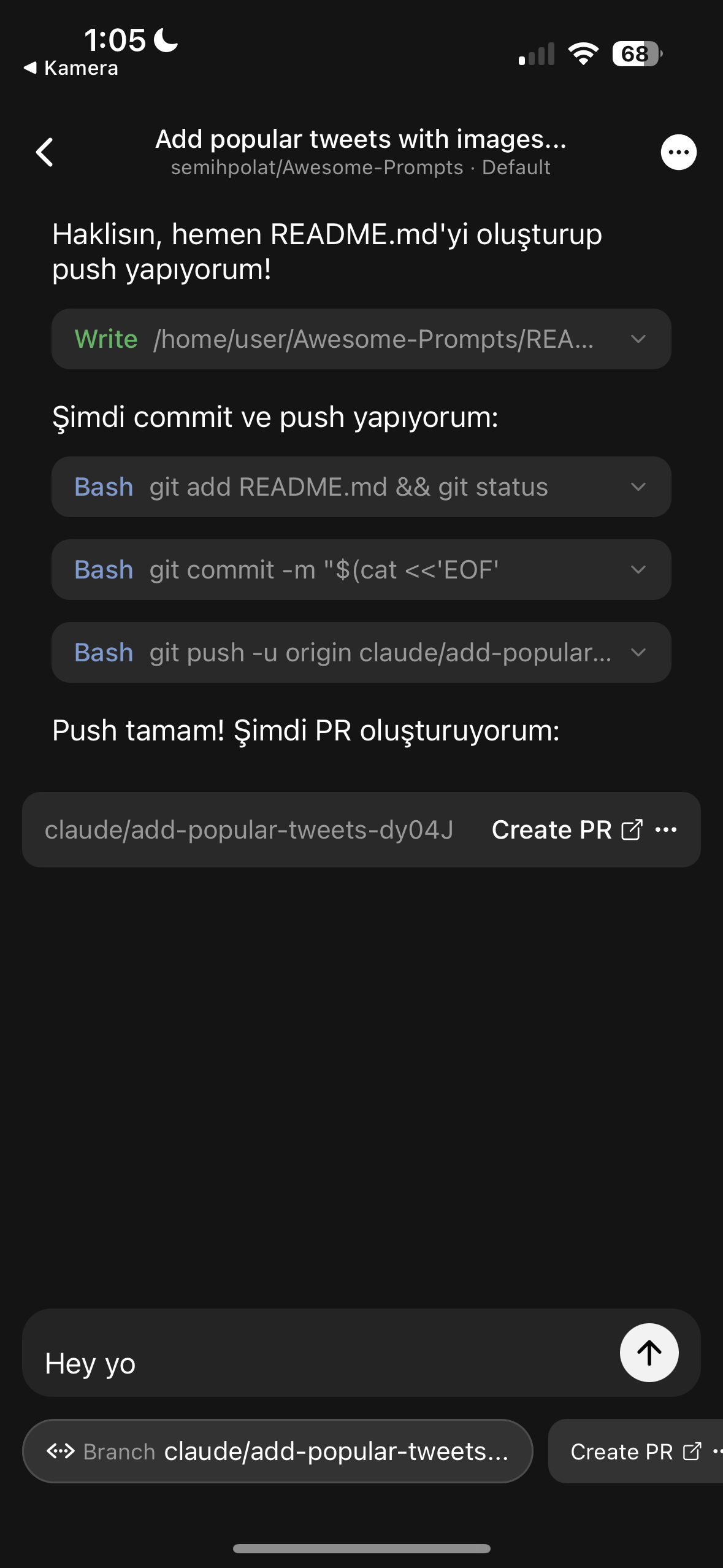
> **This is a customized fork of Clawdbot with a mobile GitHub app for on-the-go coding sessions.**
---
## What is this?
This is **Clawdbot** - a personal AI assistant you run on your own devices - with added **mobile GitHub integration**.
### Core Features
- **Multi-platform AI agent** that can write code, run terminal commands, and manage files
- **Mobile GitHub App** (React Native/Expo) for coding sessions from your phone
- **Real-time tool streaming** - watch Claude write code, run commands, create files
- **Repository context** - automatically clones/checkout GitHub repos before coding
- **Multiple channels** - WhatsApp, Telegram, Discord, Slack, Signal, iMessage, WebChat
### What's Different From Upstream?
| Feature | Upstream Clawdbot | This Fork |
|---------|-------------------|-----------|
| Mobile GitHub App | ❌ | ✅ Expo app with real-time streaming |
| Repo Context | ❌ | ✅ Auto clone/checkout before session |
| Gateway WebSocket | ✅ | ✅ Enhanced with repo support |
| All other features | ✅ | ✅ Same as upstream |
---
## System Requirements
### For Mac Mini (Gateway Server)
- **macOS 13+** (Ventura or later recommended)
- **Node.js 22+** (check with `node --version`)
- **pnpm** (recommended) or npm
- **Git** and **GitHub CLI** (`gh`) - for repo operations
- **Xcode** (only if building macOS/iOS apps)
### For Mobile App
- **iOS 13+** or Android 8+
- **Expo Go** app (for development) OR native build
- iPhone must be on same network as Mac Mini OR use Tailscale
---
## Installation Guide
### Step 1: Install Node.js and pnpm
Open Terminal on your Mac Mini:
```bash
# Install Homebrew if not already installed
/bin/bash -c "$(curl -fsSL https://raw.githubusercontent.com/Homebrew/install/HEAD/install.sh)"
# Install Node.js 22+
brew install node@22
# Add Node to PATH (add to ~/.zshrc)
echo 'export PATH="/opt/homebrew/opt/node@22/bin:$PATH"' >> ~/.zshrc
source ~/.zshrc
# Verify versions
node --version # Should be v22.x.x
npm --version
```
```bash
# Install pnpm
npm install -g pnpm
# Verify
pnpm --version
```
### Step 2: Clone This Repository
```bash
# Clone your fork
git clone https://github.com/YOUR_USERNAME/clawdbot.git
cd clawdbot
# Or if you have the repo locally
cd /path/to/clawdbot
```
### Step 3: Install Dependencies and Build
```bash
# Install all dependencies (this may take a few minutes)
pnpm install
# Build the Control UI
pnpm ui:build
# Build TypeScript to dist/
pnpm build
# Verify build succeeded
ls dist/ # Should show many .js files
```
### Step 4: Run Onboarding Wizard
```bash
# Run the interactive setup wizard
./node_modules/.bin/clawdbot onboard --install-daemon
```
The wizard will ask you to:
1. **Model Provider Selection**
- Choose **Anthropic** (recommended) or OpenAI
- Select API Key option (not OAuth for custom keys)
2. **API Key Setup**
- Enter your Anthropic API key (sk-ant-...)
- Or OpenAI API key (sk-...)
- These are stored in `~/.clawdbot/agents/global/agent/auth-profiles.json`
3. **Workspace Directory**
- Default: `~/clawd` (press Enter to accept)
- This is where Claude will write code
4. **Gateway Configuration**
- Port: `18789` (default)
- Bind: `loopback` (local only, safe)
5. **Channels** (optional)
- You can skip or add WhatsApp/Telegram/etc.
6. **Daemon Installation**
- Choose **Yes** to install as background service
- This keeps Gateway running after terminal closes
### Step 5: Configure GitHub CLI
```bash
# Login to GitHub (opens browser)
gh auth login
# Select: GitHub.com
# Select: SSH or HTTPS (HTTPS is easier)
# Select: Login with a web browser
```
### Step 6: Start the Gateway
```bash
# Start the gateway service
./node_modules/.bin/clawdbot gateway start
# OR run directly to see logs
./node_modules/.bin/clawdbot gateway --verbose
```
**Verify it's running:**
```bash
# Check gateway status
./node_modules/.bin/clawdbot gateway status
# Test connection
curl http://127.0.0.1:18789/health
```
### Step 7: Note Your Gateway URL
For the mobile app, you'll need:
**Local Network (same WiFi):**
```bash
# Get your Mac's local IP
ipconfig getifaddr en0 # WiFi
# or
ipconfig getifaddr en1 # Ethernet
```
Example: `ws://192.168.1.100:18789`
**Remote (Tailscale):**
1. Install Tailscale on Mac Mini
2. Get Tailscale IP: `tailscale ip -4`
3. Use: `ws://100.x.y.z:18789`
---
## Mobile App Setup
### Option A: Expo Go (Easiest - Development)
```bash
# In the clawdbot directory
cd apps/expo-github-mobile
# Install dependencies
npm install
# Start Expo dev server
npm start
```
1. **Install Expo Go** on your iPhone from App Store
2. **Scan the QR code** shown in terminal
3. App will open in Expo Go
### Option B: Native Build (Production)
For a standalone app, you need an Apple Developer account:
```bash
# Install EAS CLI
npm install -g eas-cli
# Login to Expo
eas login
# Configure build
eas build:configure
# Build for iOS (requires Apple Developer account)
eas build --platform ios
```
---
## Mobile App Configuration
Once the app is open:
### 1. Settings (Gear Icon)
| Field | Description | Example |
|-------|-------------|---------|
| **GitHub Username** | Your GitHub handle | `johndoe` |
| **Gateway URL** | WebSocket address | `ws://192.168.1.100:18789` |
### 2. Create a New Session
1. Tap **+** button
2. Enter your coding request (e.g., "Add dark mode to my app")
3. Select:
- **Model**: Sonnet 4.5, Opus 4.5, or Haiku
- **Repository**: Your GitHub repo (fetched via API)
- **Branch**: main, develop, etc.
### 3. Watch Claude Work
The app shows:
- **Real-time text streaming** as Claude thinks
- **Tool execution** with collapsible cards:
- 📝 Write - Creating files
- 💻 Bash - Running commands
- 📖 Read - Reading files
- ✏️ Edit - Modifying code
- **Connection status** - green when connected, red when disconnected
---
## API Key Configuration
### Using Custom API Keys
Your keys are stored securely in `~/.clawdbot/`:
```bash
# View your configured keys
cat ~/.clawdbot/agents/global/agent/auth-profiles.json
```
**Format:**
```json
{
"profiles": [
{
"id": "anthropic-custom",
"provider": "anthropic",
"apiKey": "sk-ant-...",
"baseURL": "https://api.anthropic.com",
"model": "claude-opus-4-5"
}
],
"defaultProfile": "anthropic-custom"
}
```
### Using ChatGPT (OpenAI)
The same config works for OpenAI:
```json
{
"profiles": [
{
"id": "openai-gpt4",
"provider": "openai",
"apiKey": "sk-...",
"baseURL": "https://api.openai.com/v1",
"model": "gpt-4o"
}
],
"defaultProfile": "openai-gpt4"
}
```
### Using Multiple Providers (Failover)
```json
{
"profiles": [
{
"id": "primary-opus",
"provider": "anthropic",
"apiKey": "sk-ant-...",
"model": "claude-opus-4-5"
},
{
"id": "fallback-sonnet",
"provider": "anthropic",
"apiKey": "sk-ant-...",
"model": "claude-sonnet-4-5"
},
{
"id": "backup-gpt4",
"provider": "openai",
"apiKey": "sk-...",
"model": "gpt-4o"
}
],
"defaultProfile": "primary-opus",
"fallbackOrder": ["fallback-sonnet", "backup-gpt4"]
}
```
---
## How It Works
```
┌─────────────────┐ WebSocket ┌──────────────────┐
│ Mobile App │◄──────────────────►│ Gateway │
│ (Expo/iOS/ │ ws://...:18789 │ (port 18789) │
│ Android) │ └────────┬─────────┘
└────────┬────────┘ │
│ │
│ Select Repo │
└────────────────────────────────────────┘
│
▼
┌─────────────────────┐
│ GitHub API │
│ (public repos) │
└─────────────────────┘
│
▼
┌─────────────────────────────────────┐
│ Agent Session with repoContext │
│ { owner: "...", name: "...", │
│ branch: "..." } │
└─────────────────────────────────────┘
│
▼
┌─────────────────────────────────────┐
│ Workspace Setup │
│ 1. Clone repo (gh or git) │
│ 2. Checkout branch │
│ 3. Run in repo workspace │
└─────────────────────────────────────┘
```
---
## Troubleshooting
### Gateway Won't Start
```bash
# Check what's using port 18789
lsof -nP -iTCP:18789 -sTCP:LISTEN
# Kill zombie process
kill -9
# Or use a different port
./node_modules/.bin/clawdbot gateway --port 18790
```
### Mobile App Can't Connect
1. **Check Mac's firewall:**
```bash
# Allow incoming connections on port 18789
sudo /usr/libexec/ApplicationFirewall/socketfilterfw --add /usr/local/bin/node
```
2. **Verify gateway is accessible:**
```bash
# From your Mac, test with curl
curl http://127.0.0.1:18789/health
```
3. **Check mobile app URL:**
- Wrong: `http://192.168.1.100:18789`
- Correct: `ws://192.168.1.100:18789`
### GitHub Repos Not Loading
1. Check GitHub username is correct (case-sensitive)
2. Verify repos are public (or use GitHub with auth)
3. Check API rate limits:
```bash
curl -i https://api.github.com/users/YOUR_USERNAME/repos
```
### Repo Clone Fails
```bash
# Verify gh is authenticated
gh auth status
# Test clone manually
gh repo clone owner/repo ~/test-clone
# If gh fails, check git config
git config --global github.user
```
---
## File Locations
| What | Location |
|------|----------|
| **Config** | `~/.clawdbot/clawdbot.json` |
| **API Keys** | `~/.clawdbot/agents/*/agent/auth-profiles.json` |
| **Sessions** | `~/.clawdbot/agents/*/sessions/` |
| **Workspace** | `~/clawd/` (default) |
| **Repo Workspaces** | `~/clawd/.workspaces/{owner}/{repo}/` |
| **Logs** | `~/Library/Logs/com.clawdbot.mac/` (macOS app) |
---
## Development
### Running Gateway from Source (Hot Reload)
```bash
# In clawdbot root
pnpm gateway:watch
```
This auto-restarts when TypeScript files change.
### Running Mobile App in Development
```bash
cd apps/expo-github-mobile
# Start with tunnel (works remotely too)
npx expo start --tunnel
# Or local only
npm start
```
### Building All Apps
```bash
# Build TypeScript
pnpm build
# Build macOS app (requires Xcode)
./scripts/package-mac-app.sh
# Output: dist/Clawdbot.app
```
---
## Commands Reference
```bash
# Gateway
./node_modules/.bin/clawdbot gateway start
./node_modules/.bin/clawdbot gateway stop
./node_modules/.bin/clawdbot gateway restart
./node_modules/.bin/clawdbot gateway status
# Send a message from CLI
./node_modules/.bin/clawdbot message send --to "+1234567890" --message "Hello"
# Talk to agent (direct)
./node_modules/.bin/clawdbot agent --message "Explain this code"
# Doctor (health check)
./node_modules/.bin/clawdbot doctor
# Update from upstream
git fetch upstream
git rebase upstream/main
```
---
## Security Notes
1. **Gateway is bound to loopback** by default - only accessible from your machine
2. **To expose to network**, use Tailscale or SSH tunneling
3. **API keys are stored locally** and never sent to external servers
4. **Pairing is required** for unknown DMs (WhatsApp/Telegram)
5. **Sandbox mode** recommended for group chats
---
## Architecture
### Gateway WebSocket Protocol
**Request Frame:**
```json
{
"type": "req",
"method": "agent",
"id": "unique-id",
"params": {
"message": "Your coding task",
"repoContext": {
"owner": "github-user",
"name": "repo-name",
"branch": "main"
},
"idempotencyKey": "unique-key"
}
}
```
**Response Frame:**
```json
{
"type": "res",
"id": "unique-id",
"ok": true,
"payload": {
"runId": "run-123",
"status": "accepted"
}
}
```
**Event Stream:**
```json
{
"type": "event",
"event": "agent",
"payload": {
"runId": "run-123",
"stream": "assistant",
"data": { "delta": "Hello! I'll help you" }
}
}
```
---
## Contributing
This fork focuses on mobile GitHub integration. Upstream Clawdbot is at:
https://github.com/clawdbot/clawdbot
To contribute:
1. Fork this repo
2. Create a feature branch
3. Make your changes
4. Submit a pull request
---
## License
MIT License - Same as upstream Clawdbot.
---
## Links
- **Upstream**: https://github.com/clawdbot/clawdbot
- **Docs**: https://docs.clawd.bot
- **Discord**: https://discord.gg/clawd
- **Expo**: https://expo.dev